PS3 BD BT Remote
Once upon a time I've made XBMC based HTPC... And as any proper HTPC mine should also have a remote control.
Since my TV is Sony, the choice was obvious - Sony PS3 BD BT Remote - both remotes are almost the same which makes HTPC looks aesthetic.
Then however I've realised that despite being recognized as a generic HID keyboard, keys mapped to buttons aren't seen by Xorg (XInput to be precise). Second issue i found was related to battery power. Don't know how PS3 is properly handling it but I solved the problem by suspending the HID via explicit teardown of BT link.
The entire story is here, some attempts were made to publish patches into bluez tree - although they were rejected by bluez devs. Well, since then I'm maintaining this repository for myself and anyone interested.
Patches could be fetched from repo - just click to package details and then expand any package
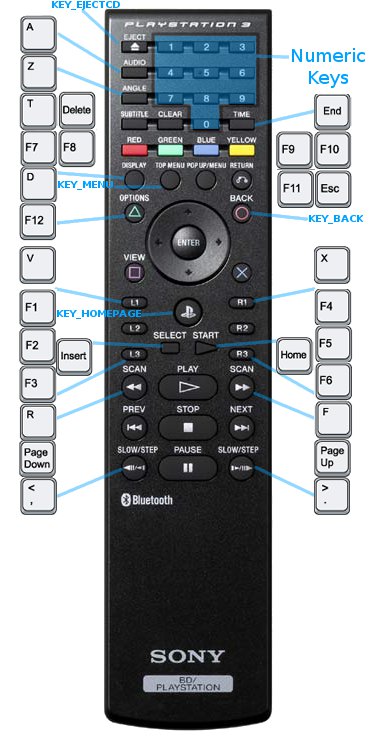
Alternate map, enabled by 'Compat=1' config option - on the image
With this layout I'm using following custom keymap for XBMC:
ruff@ruff:~/bluez$ cat ~/.xbmc/userdata/Keymap.xml
<keymap>
<global>
  <keyboard>
        <insert>Queue</insert>
        <a>AudioNextLanguage</a>
        <x>Close</x>
        <f1>VolumeDown</f1>
        <f4>VolumeUp</f4>
        <f2>SetVolume(50)</f2>
        <f3>SetVolume(75)</f3>
        <d>FullScreen</d>
        <t>ActivateWindow(Favourites)</t>
        <f7>XBMC.ActivateWindow(MyMusic)</f7>
        <f8>XBMC.ActivateWindow(MyVideos)</f8>
        <f9>XBMC.ActivateWindow(MyPictures)</f9>
        <f10>XBMC.ActivateWindow(Weather)</f10>
        <f11>ContextMenu</f11>
        <v>Playlist</v>
        <end>XBMC.ActivateWindow(ShutdownMenu)</end>
  </keyboard>
</global>
<MusicPlaylist>
  <keyboard>
        <f12>MoveItemUp</f12>
        <v>MoveItemDown</v>
        <d>Playlist</d>
  </keyboard>
</MusicPlaylist>
<MusicPlaylistEditor>
  <keyboard>
        <f12>MoveItemUp</f12>
        <v>MoveItemDown</v>
        <d>Playlist</d>
  </keyboard>
</MusicPlaylistEditor>
<Visualisation>
  <keyboard>
        <f12>Playlist</f12>
        <home>reloadkeymaps</home>
  </keyboard>
</Visualisation>
<VideoPlaylist>
  <keyboard>
        <f12>MoveItemUp</f12>
        <v>MoveItemDown</v>
        <d>Playlist</d>
  </keyboard>
</VideoPlaylist>
<FullscreenVideo>
    <keyboard>
        <f12>NextSubtitle</f12>
        <menu>ShowVideoMenu</menu>
    </keyboard>
</FullscreenVideo>
</keymap>
Pairing
To switch remote to the pairing mode you need to push and hold Start + Enter buttons for 5-10 seconds. It will then become discoverable and could be added as simple input device.
Link... Tue Oct 6 22:01:43 2009 Upd.: Sun Mar 5 13:33:03 2017